
If you don’t know how to create a account please read our first Article
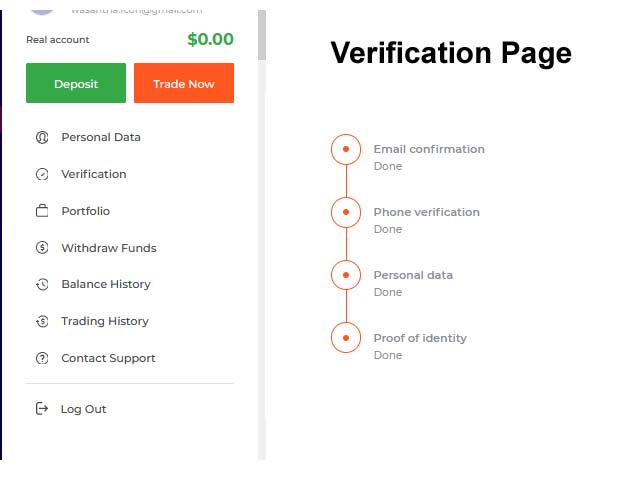
1. Click on verification
2. It will go to verification page
3. Do the below steps and wait few hours.
Verification process is a important thing for real trading. Just follow thse easy steps.
- Verify your identity
- Verify your address of residence (only for traders from EU)
- Bank Card verification ( if you made a deposit via your credit or debit card)
Identity verification
You must provide a scan copy or a image of one these documents
- Passport – only the page with your photo
- ID card – both sides
- driver’s license – both sides
Note – It must be clear and not expired.
Address verification
Here are the documents you need, Document should be clear and It should be scan copy or Image
- Bank statement – Creadit card statement or bank statement. (can get it from your bank )
- Utility bill – electricity, telephone, water, etc.
- Document from the municipality confirming your address with an official stamp
- Tax statement
Note :- The document must contain your name and address.
Bank card verification
To prove the ownership of the card you are using for transactions, you must provide a scan or a photograph of both sides of the card.
Requirements
- The card must contain your name , If not contact IQoption and explain them
- Visible of CVV code on the back side of the card.
- Sign on the back side of the card
General requirements for the documents.
- Document Should not crop and all edges of the document should be visible.
- The image should not be blurry, and the information must be clear.
- The size of the uploaded file must not exceed 8 MB.
- Allowed formats : JPG and PNG
You can always check your verification status in your IQ Option account.